Tuesday, November 3, 2026

Oracle SmartView version 26.200 - New Features!

Oracle Smart View for Office 26.200 and New Features!

Oracle Smart View for Office version 26.200 comes with exciting new features and updates for EPM Cloud applications.  You can download from My Oracle Support and Oracle Technical Resources (formerly Oracle Technology Network).

Applies to: Account Reconciliation, Enterprise Profitability and Cost Management, Financial Consolidation and Close, FreeForm, Narrative Reporting, Planning, Profitability and Cost Management, Tax Reporting

The following new features are included:

  • Enhancements in IPM Insights in Smart View
    • Support for Period Movement Variance Insight
    • View Contextual Insights for Forms
  • Work on Reports in Microsoft PowerPoint using Smart View
  • Improvements in Member Selection Search
    • Use Preferred Option to Search Members
    • View Hierarchy of Members from the Flat List of Search Results
  • Open Flex Form as a Regular Form from Task List and Right-Click Context Menu
  • New Health Check Option: WebView2 Runtime Shared

Business Benefit: This Smart View release includes the latest features, improvements, and defect fixes.

Oracle EPM - IPM Insights: Ability to Show Top Insights in Dashboards

Oracle IPM Insights Assistant and How to Enable Dashboards?

The IPM Insights Assistant used within EPM Assistants enables Service Administrators to download AI agent templates for integrating Cloud Enterprise EPM or Cloud EDM with Fusion AI Agent Studio.

Applies To: Enterprise Profitability and Cost Management, FreeForm, Financial Consolidation and Close, Planning, Tax Reporting 

The IPM Insights Assistant provides a reusable AI Agent Studio workflow that enables agentic applications to retrieve, validate, and present IPM Insights. The workflow supports the following paths:

  • Retrieve Insight detail by Insight ID—Use this path when you already have an Insight UUID, usually obtained from an earlier Insights retrieval.
  • Retrieve applicable Insights from business process context—Use this path when you provide business process context and need applicable Insights.
  • Retrieve open Insights without context—Use this path when neither an Insight ID nor business process context is supplied.
You can now include the top insights in Dashboards 2.0.

Applies To: Enterprise Profitability and Cost Management, Financial Consolidation and Close, FreeForm, Planning, Tax Reporting

When you pair this feature with the ability to use a dashboard as a landing page, you enable planners to see relevant insights immediately when they log in. 

Top Insights in a Dashboard Used as a Landing Page

Users can also choose to display the available insights in a table.


Users can click the Actions Actions menu menu in an insight to see insight details, open it as an ad-hoc grid, and dismiss or delete an insight.
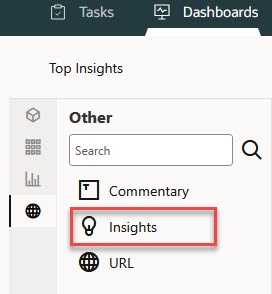
Administrators use the Dashboards Designer to add an Insights component to the dashboard:

Dashboard Object Palette